Posts

Upload Kurs to SAP from BI web site

Image
dSanca adalah program untuk upload rate dari website Bank Indonesia ke SAP. jika tertarik silakan di download versi trialnya disini .

FAGL_FC_VAL and SM35

When running SM35 from FAGL_FC_VAL every line item document user have to input field business area, this is make frustrate input. How to make automatic input right business area ? Solution : 1. Make field status group GL account for fields business area optional 2. Setting substitution role for fill right value for business area. Just it ... and know your user client will be little bit happy :)

How to handle one SAP T-CODE link to many report/program ?

If you implement SAP more than one company in one machine (client) where few report/program has a same purpose and we have to create few T-CODE for same purpose report/program. The Question is How to create one T-CODE for many report/program. For handle this 1. Just copy t-code and program in START_REPORT to ZSTART_REPORT and add new dialog screen for input company code and add checking authorization in module user_command. 2. Create table for maintain link between tcode and program name.     Field                    Type                                 Key     MANDT              MANDT                 ...

New GL Manual Update FAGLFLEXA & FAGLFLEXT

Image
Recently we go live the system on sep 1st, due to missing customization PRCTR & KOSTL filed not updated in General ledger view ( FAGLFLEXA & T ) Tables. We came to know Sep 9th and we did the customization and transported. That day onwards system updating PRCTR and KOSTL filed in those tables. Could you please help me, how do we update PRCTR and KOSTL fields in New general ledger tables & also tell me what are the impacts, if direct table updation. Solution : Delete the line item whichever not having profi centre from FAGLFLEXA & FAGLFLEXT tables & run the GLGCU1 transaction code. GLGCU1 retriving data from BSEG tables and posted in above mentioned FLEX tables. How to deleted please read How to delete line item (row) of SAP table ?

How to delete line item (row) of SAP table ?
How to delete line item (row) of SAP table ? Answer : you can use se16n transaction like this: start tr. se16n type the table name and press ENTER. Then type the string "&sap_edit" into the command line and strike Enter again. enter your selection criteria. run.(F8) now you can easily delete the lines you want (and then save) All Changes are noted in the tables SE16N_CD_DATA and SE16N_CD_KEY. Nice answer from christina *************************** There are another way to delete this table, you can create abap program  for delete detail and summary table New GL. This is example ABAP program for that purpose REPORT  zfi_fagl_del. TABLES : faglflexa,faglflext. INCLUDE : zgen_alv,zgen_alv_event. SELECTION-SCREEN BEGIN OF BLOCK box1 WITH FRAME TITLE text-t01. SELECT-OPTIONS :             s_bukrs FOR faglflexa-rbukrs OBLIGATORY. PARAMETERS:          ...

Error when Assign Chart of Depreciation to Company Code

Company code entries for AW07 are incomplete - See long text Message no. AC551 Diagnosis The result of the check of company code AW07 shows that important global parameters from Financial Accounting are missing for Asset Accounting. One or more of the following fields are affected: Currency Chart of accounts Fiscal year version Input tax indicator for non-taxable transactions Procedure You cannot use the company code for Asset Accounting without this information. First complete these entries. Solution Complete setting for Assign Input Tax Indicator for Non-Taxable Acquisitions (OBCL)

Step by Step SAP Splitting Document

Image
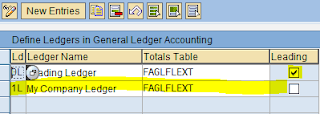
Sap Document Splitting in SAP ECC 6.0 For splitting document in General Ledger View you can following this step. 1. Adding new ledger. this step is optional if you only using one leading ledger (sap "0L"). >Financial Accounting (New) > Financial Accounting Global Setting (New) > Ledgers > Ledger >  Define Ledgers for General Ledger Accounting 2. Financial Accounting (New) > Financial Accounting Global Setting (New) > Ledgers > Ledger > Define and Activate Non-Leading Ledgers Define this menu because we add new ledger (1L) 3. Financial Accounting (New) > Financial Accounting Global Setting (New) > Ledgers > Ledger  > Assign Scenarios and Customer Fields to Ledgers This is the core for selecting field will be SUM in General Ledger document We add scenario FIN_PCA, this scenario splitting document by profit center. What is FIN_PCA you can see at  Financial Accounting (New) > Financial Accounting Global Setting (New) >...