Posts

Showing posts with the label FI-GL New GL

FAGL_FC_VAL and SM35

When running SM35 from FAGL_FC_VAL every line item document user have to input field business area, this is make frustrate input. How to make automatic input right business area ? Solution : 1. Make field status group GL account for fields business area optional 2. Setting substitution role for fill right value for business area. Just it ... and know your user client will be little bit happy :)

New GL Manual Update FAGLFLEXA & FAGLFLEXT

Image
Recently we go live the system on sep 1st, due to missing customization PRCTR & KOSTL filed not updated in General ledger view ( FAGLFLEXA & T ) Tables. We came to know Sep 9th and we did the customization and transported. That day onwards system updating PRCTR and KOSTL filed in those tables. Could you please help me, how do we update PRCTR and KOSTL fields in New general ledger tables & also tell me what are the impacts, if direct table updation. Solution : Delete the line item whichever not having profi centre from FAGLFLEXA & FAGLFLEXT tables & run the GLGCU1 transaction code. GLGCU1 retriving data from BSEG tables and posted in above mentioned FLEX tables. How to deleted please read How to delete line item (row) of SAP table ?

Step by Step SAP Splitting Document

Image
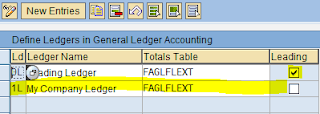
Sap Document Splitting in SAP ECC 6.0 For splitting document in General Ledger View you can following this step. 1. Adding new ledger. this step is optional if you only using one leading ledger (sap "0L"). >Financial Accounting (New) > Financial Accounting Global Setting (New) > Ledgers > Ledger >  Define Ledgers for General Ledger Accounting 2. Financial Accounting (New) > Financial Accounting Global Setting (New) > Ledgers > Ledger > Define and Activate Non-Leading Ledgers Define this menu because we add new ledger (1L) 3. Financial Accounting (New) > Financial Accounting Global Setting (New) > Ledgers > Ledger  > Assign Scenarios and Customer Fields to Ledgers This is the core for selecting field will be SUM in General Ledger document We add scenario FIN_PCA, this scenario splitting document by profit center. What is FIN_PCA you can see at  Financial Accounting (New) > Financial Accounting Global Setting (New) >...